Comparisons

AI Girlfriend Image Generator: 8 Tools Tested in 2026

by Maya Renner Maya Renner · AI Companion App Reviewer 16 min read
Share
AI girlfriend image generator — 8 tools tested in 2026

The short version

An AI girlfriend image generator is no longer just "a model that draws a pretty picture from a prompt." In 2026 the deciding factor is something else: consistency. The same face, the same body, the same freckle — on the tenth, fiftieth and two-hundredth frame. Styles, poses, outfits and video all sit on top of that.

The second factor is how many clicks it takes to get the shot you pictured. Some services make you write a three-line prompt and rewrite it five times. Others give you a builder where a frame is assembled with toggles in ten seconds. Those are different products, even though both are called an AI girlfriend generator.

The third is honest pricing. Almost everywhere the subscription covers chat, while images burn separate tokens or hit a hard daily cap. For anyone who generates photos daily, the real monthly bill lands two to four times above the number on the landing page.

Below: eight services compared on those three criteria, an explanation of why your character drifts from frame to frame, and a practical section on prompts and turning a photo into video.
What an AI girlfriend image generator actually is

Technically any modern image model can draw a woman from a description. But a general "AI image generator" and an AI girlfriend generator solve different problems, and confusing the two is where most disappointment comes from.

A general-purpose image generator

You write a prompt, you get an image. Every run is independent: the model has no idea you generated the same heroine yesterday. Want the same face again? Describe it in words and hope, or go learn reference images and weights. Great for a single shot, painful for a series.

An AI girlfriend generator inside a companion app

Here the character has a saved appearance — a set of traits and/or a locked reference image that gets mixed into every generation. You change the scene, the outfit, the angle and the mood; the face stays. That single difference is what makes a hundred-frame album look like a photo shoot of one person instead of a gallery of eight different women.

Generation from inside the conversation

The third and youngest format: the image comes not from your prompt but from the scene of the chat. You are in a roleplay conversation, and on request the service visualises what is happening right now — the setting, the pose, the expression. You never write a prompt; the context assembles it. That frame reads differently: it is not "a picture on a theme," it is an illustration of your own story.

If you are still at the start, read what an AI girlfriend is and the step-by-step guide on how to create an AI girlfriend — this article picks up where they end and is entirely about the visual side.

The core problem: character consistency

Ask anyone who has used generators for more than a week what annoys them most and you get one answer: she doesn't look like herself. In the first frame the nose is thinner, in the third the eye shape changed, in the fifth she is suddenly a different ethnicity. Technically that isn't a bug — it follows from how diffusion models work.

Why the face drifts

The model does not store your character. It rebuilds the image from noise every single time, guided by a text description and a random seed. "A 25-year-old woman, dark hair, green eyes" defines an enormous space of acceptable faces — and the model honestly samples different points from it. Longer descriptions narrow the space but never collapse it: words simply are not precise enough.

Three ways this gets fixed

1. Fixed seed plus a prompt template. The cheapest approach: the service remembers the seed and the exact wording and reuses them. Works until you change the scene — swap the angle or the outfit and the face wanders again.

2. A reference image. A canonical portrait is fed into generation as a visual hint. Holds the face noticeably better than text, especially on close-ups. Struggles on wide shots and complex poses.

3. A fine-tuned personal model (the LoRA approach). A small adapter is trained on one specific appearance. This is the most robust option: the face holds across styles, angles and lighting. It costs more compute, so consumer services use it selectively — usually for the platform's own "official" characters rather than every user-made one.

Practical takeaway: if you need a series of one heroine, don't judge by the landing-page samples (always the best frame out of a hundred). Look at what happens on the fifth and tenth image in a row. That is where services actually differ.

Comparison table: 8 AI girlfriend image generators

Eight services side by side. "Builder" means a frame is assembled from toggles and lists, not only a text prompt. "From chat" means the service can visualise the current scene of a conversation with no manual prompt. Prices are approximate monthly equivalents and vary by region and promotion.

ServiceStrongest atStylesBuilderFrom chatVideoPrice/mo
Candy AIReady-made character catalogue, polishRealistic, animePartialYesShort clips~$6–13 + tokens
DreamGFGeneration speedRealistic, animeYes, menu-drivenLimitedLimited~$6–28
KindroidMemory + character selfiesRealisticNoYesNo~$14
NomiLong memory, living personalityRealistic, animeNoYesNo~$16
Character.AICharacter libraryIllustrationNoLimitedNo~$10
SpicyChatContent freedomAnime, realisticNoYesNo~$5–20
General models
(Flux, SDXL and similar)
Maximum controlAnyNo (manual interfaces)NoVia third-party models$0 + compute
NikaStudio builder + frames from the chatRealistic, anime, illustrationYes, deepYes8-second clipsFree / paid + tokens

What follows is a breakdown by category. Pick the row that describes your job, not an abstract number one.

Best catalogue of ready-made characters — Candy AI

If you want to configure nothing and get decent photos of an already-built character fast, the honest category leader is Candy AI. A large storefront of preset heroines, a tidy interface, even portrait quality and the option to turn a frame into a short clip. It is the most polished product in the niche, which is exactly why it sits first in nearly every roundup.

Its weak spot is the one shared by most paid media-heavy services: double billing. The subscription (roughly $6 on annual, about $13 monthly) covers chat, while images, video and voice burn separate tokens. Users whose main use case is photos routinely report a real monthly bill well above the landing-page price. A head-to-head is in Nika vs Candy AI, and options are in our Candy AI alternatives roundup.

Best personality-plus-photo pairing — Kindroid and Nomi

On Kindroid and Nomi, images are not a separate tool but an extension of the relationship. The character remembers your history for weeks, so the "selfie" it sends reads as a message from a specific person rather than the output of a generator. On raw picture quality these lose to dedicated generators; on the feeling of coherence, they win.

The limitation is honest: both run on flat subscriptions (roughly $14 and $16) and offer almost no fine visual control. If you want to compose a specific frame with specific lighting, pose and wardrobe, the tools simply are not there. More on memory itself in our Nomi AI alternatives roundup.

A builder instead of a prompt — Nika Studio

This is our own block, and we will name the angle up front: Nika does not win on "the prettiest picture." It wins on how the frame gets assembled.

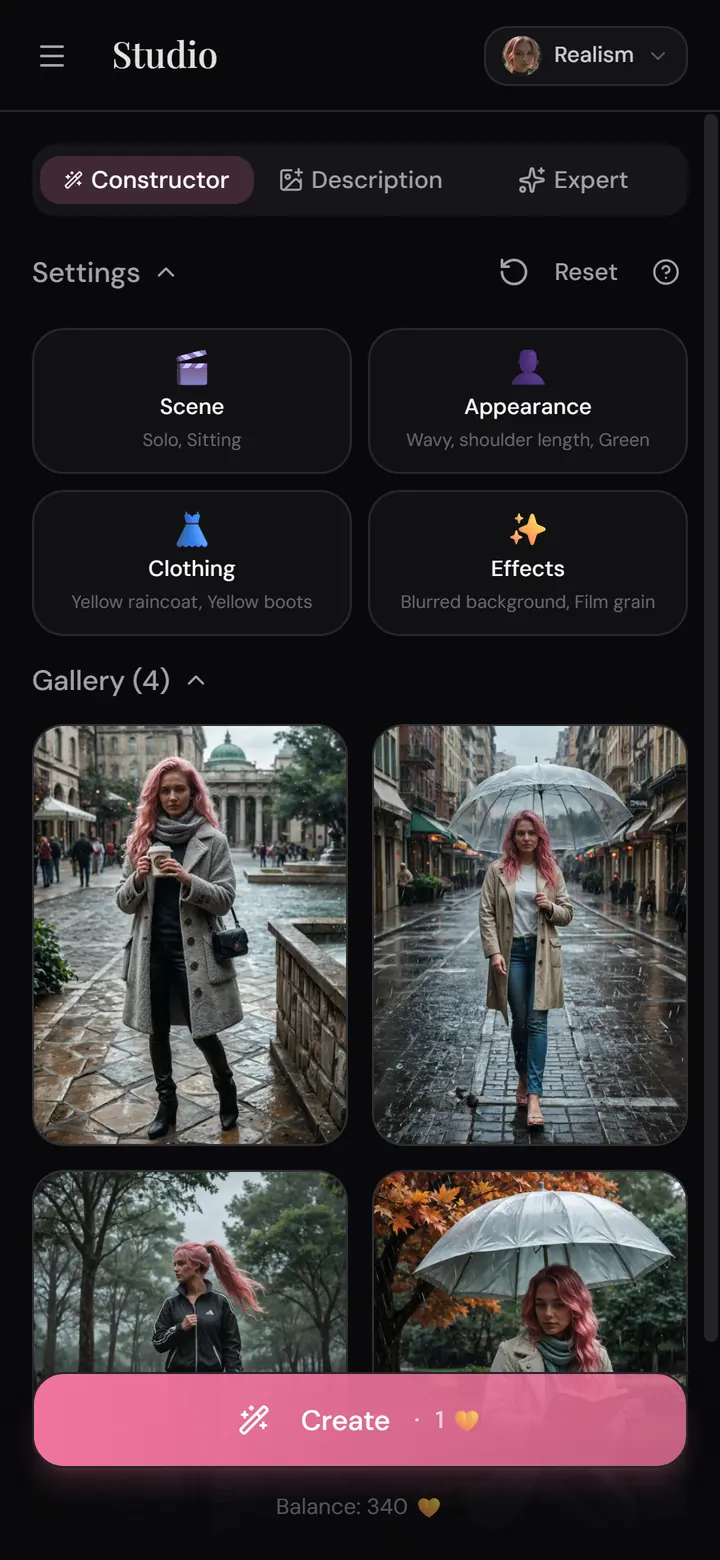
On most services the path to the shot you wanted looks like this: write a prompt → get the wrong thing → rewrite the prompt → get almost the thing → repeat. You are effectively learning to speak the model's language. In Nika's Studio the path is different: it is a photo builder with a very large set of controls where the frame is composed with toggles — appearance, wardrobe, pose, setting, lighting, mood. The number of combinations is effectively unlimited, and you never have to write a line of prompt. You still can if you want to — free-text description is supported — but it is an option, not a requirement.

The second format is a frame straight out of the conversation. During a roleplay chat you can spend tokens on an image, and it depicts the latest scene: what is happening right now, in the setting and mood your story has arrived at. The context writes the prompt, not you.

The third is the scenario gallery: every official scenario has a set of ten images that unlock as your message count grows (or immediately for tokens). The further into the story, the more interesting the frames — the visual layer works as a reward for progress rather than a separate purchase.

Honest limits. Nika is one central character across many scenarios, not a storefront of a hundred ready-made heroines: if a catalogue is what you want, Candy AI and DreamGF fit better. Images and video consume tokens, and some features are gated on the free tier. And Nika is built for long, thoughtful roleplay — generating for the sake of generating is possible (that is what Studio is for) but it is not the product's main scenario.

What no competitor offers, though: all of this runs inside Telegram, with no app install and no signup — and in parallel in the web app at app.nika.team, which has the nicer interface. More on the messenger-native angle in our guide to AI girlfriends on Telegram.

Realistic, anime or illustration: picking a style

Nearly every service offers a style choice, and it affects more than taste — it changes how often the model makes visible mistakes.

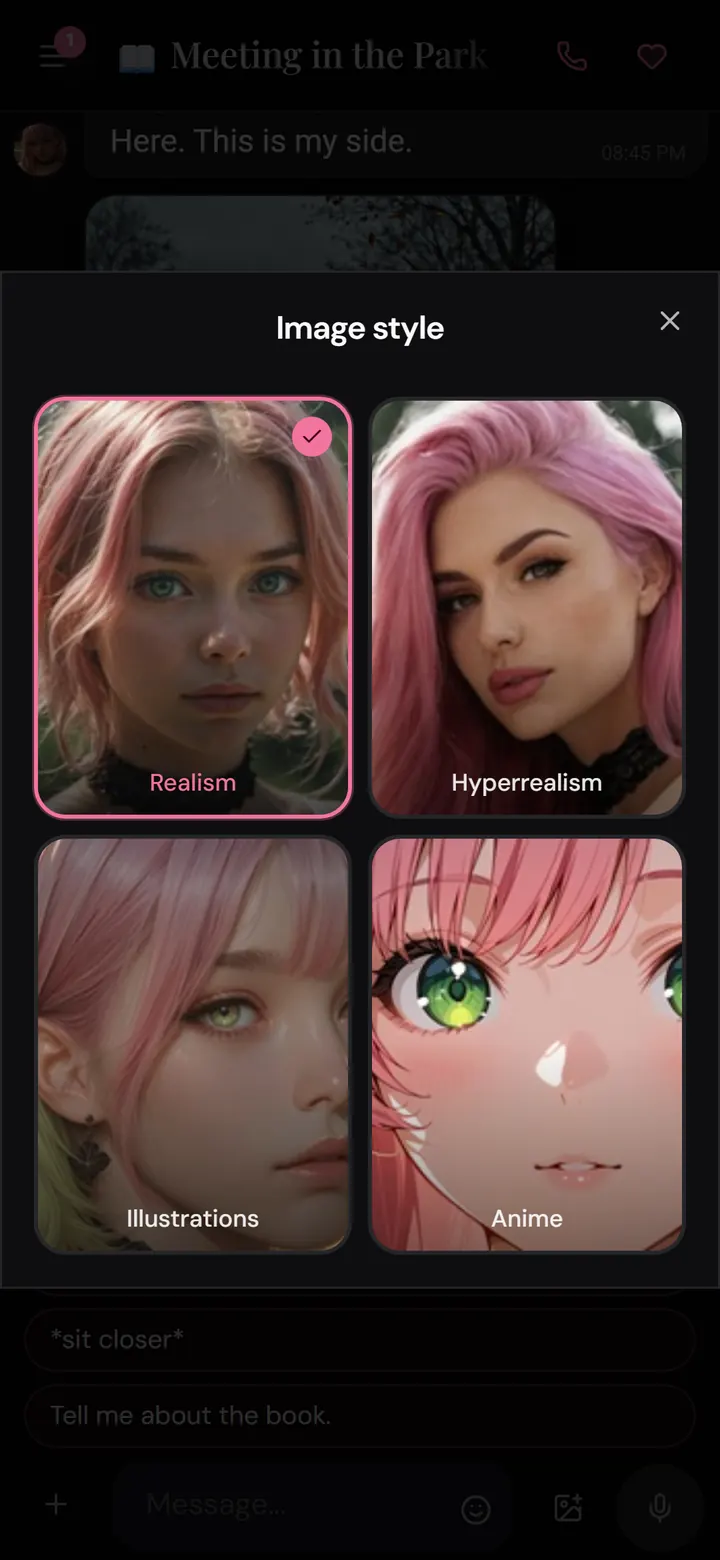
Realistic

The most demanding mode. Photoreal skin, natural light, believable anatomy — and also every artifact on display: an extra finger, a broken shadow, a plastic-looking face. Realism works best on portraits and medium shots, worst on complex poses and multi-subject scenes. For a series it demands the strictest consistency, because the eye instantly notices a swapped human.

Anime

The most forgiving style. Stylised anatomy means small errors simply do not read as errors, and recognisability rests on traits — hair colour, hairstyle shape, eyes — that models reproduce far more stably than a photoreal face. If consistency matters more to you than photorealism, anime is the safest choice.

Illustration

The middle ground: quasi-realistic images in a comic or graphic-novel register. Proportions stay close to real, but the rendering is stylised, so artifacts get masked. Excellent for long narrative series where a single visual language matters, and worse if you want the frame to pass as an actual photograph.

Practical advice: choose the style before you start a series and do not switch mid-way. Changing style breaks character recognisability more reliably than changing pose or outfit.

From photo to video: what 8-second clips really do

The big visual shift of 2025–2026 was the move from stills to motion. The pattern is nearly universal: you get an image first, then "animate" it — the model extrapolates a few seconds of movement while preserving the face and composition of the source frame.

What to keep in mind about these clips:

  • The length is honestly short. Consumer generations run 5–10 seconds. In Nika it is a very high-quality 8-second clip made from an image you already created. Longer videos exist in the industry, but they are assembled through extension and stitching rather than generated whole.
  • Quality is bounded by the source. Video does not fix problems in the still — it amplifies them. A malformed hand in the photo becomes more obvious in motion. So it is worth animating only a frame you are genuinely happy with.
  • Simple motion wins. A head turn, breathing, a glance at the camera, hair moving slightly — these are convincing almost every time. Complex actions with changing angles and object interaction break far more often.
  • Mainstream video models filter heavily. The large general-purpose video generators run layered moderation on prompt, generation and output. Companion services with their own pipeline are freer — which is precisely why video inside such apps exists at all.

The economics differ too: video costs several times more than an image almost everywhere, because it costs incomparably more compute. Budget accordingly — animating every frame in a row makes little sense.

What it actually costs: tokens vs caps

This is where disappointment usually hides. The landing-page price buys chat. Media is nearly always billed separately, under one of two models.

Tokens (credits)

You buy internal currency and spend it per image, video or voice message. Upside: you pay only for what you use, and you can generate heavily one month and not at all the next. Downside: the bill is unpredictable, and an active daily-generation habit easily doubles or triples your spend relative to the subscription. Candy AI and Nika both work this way.

Hard caps

The plan includes a fixed number of images per day or month; after that it is a wall until the next period, or an upgrade. Upside: predictability — you know your ceiling. Downside: the ceiling arrives exactly when you are enjoying yourself, not when it is convenient. DreamGF and most three-tier pricing grids work this way.

How to compare honestly

Estimate your real scenario: how many images per week do you actually need? Multiply by the per-frame price (or check whether you fit inside the cap) and add that to the subscription. Only that total is comparable between services. Separately, watch for the two billing patterns people get burned by most: "first month cheaper, then full price on auto-renew," and "trial tokens run out on the third frame."

Nika's line sits here: the first 24 hours after signup open a promo tier with every feature and an extended message allowance; after that chatting stays free with a daily message limit, while paid plans raise or remove the limit and unlock gated features. Tokens for images, video and voice are bought separately, and a small starter pack is free. Payment works via crypto, local rails (SBP for users in Russia) and, inside the Telegram bot, Telegram Stars.

Prompting: getting the frame right on the first try

Even when a service gives you a builder, text descriptions eventually come up. A few principles that save the most attempts.

Describe the frame, not the person

The beginner mistake is writing appearance traits: "beautiful girl, long hair, cute." The model already knows what she looks like (if the appearance is locked), and "beautiful" carries no information. Describe what makes this picture specific instead: shot size (close-up, waist-up, full length), angle, lighting, setting, action, mood.

Lighting is the most underrated parameter

The same character in "soft morning light through a window" versus "neon backlight in a night bar" gives two fundamentally different frames. Lighting shapes perception more than pose and wardrobe combined — and it almost never breaks facial recognisability.

One change at a time

If a frame is nearly right, change one parameter and regenerate. Rewriting the whole prompt does not give you an improved version — it gives you a different picture, and you lose whatever was already working.

Avoid negations in the main description

Phrases like "no glasses" or "not in a dress" work badly: the model reacts to the mentioned concept, not the negation. If the service has a separate negative-prompt field, use it; if not, describe what should be there rather than what shouldn't.

Save the wordings that worked

A prompt that produced a good result is a reusable template. Keep a note and change only the scene inside it. That is the only reliable path to a series rather than a pile of lucky accidents.

Privacy, adult content and the law in 2026

The visual layer is the most sensitive part of this niche, so check three things before you generate anything.

Where your images and chats are stored. A serious service has a readable privacy policy, encryption and a way to delete your history. If a site has no policy and no owner contact, only a payment button — that is a red flag.

Where your uploaded photos go. A separate line: services offering to "make an AI girlfriend from a photo" of a real person. Generating intimate imagery of a real person without their consent is illegal in many jurisdictions and is being regulated more tightly through 2026, regardless of what a given site's terms claim. Responsible platforms do not allow it, and that is a sign of product maturity rather than a limitation.

Age gates and moderation. The AI companion market is maturing: 2025–2026 brought a wave of chatbot regulation — notably US legislative pushes around age verification and disclosure that the interlocutor is an AI — and platforms are broadly tightening checks. A service that draws no line at all between SFW and adult content and moderates no user-generated material is more likely a temporary project than a reliable one.

On Nika, adult content is available to adult users who want it, and user-made scenarios go through moderation. The product's focus is still long narrative roleplay; explicit content is an addition to that, not the main storefront.

How we tested

We scored every AI girlfriend image generator on five criteria: character consistency (how identical the heroine stays across ten consecutive frames with changing scenes), controllability (how many attempts it takes to get the frame you had in mind), style range (realistic, anime, illustration and the quality of each), the jump to video (whether it exists and whether it holds the face) and total cost of a month of daily generation rather than the subscription price.

Consistency was tested the simplest and most merciless way: define the character once, then generate a series changing one parameter at a time — first the pose, then the outfit, then the setting, then the lighting. A service passed if on the tenth frame the heroine still read as the same person. Controllability was counted in attempts: how many generations were needed to hit a pre-specified target frame. Cost was computed on the full bill including media tokens, because hidden spend is what moves the final number most.

Some competitor pricing and feature data comes from their public plans and reviews as of publication; pricing in this niche changes often, so verify current numbers on the services' own sites.

FAQ

What is the best AI girlfriend image generator in 2026?

There is no single best — only best for a job. For a large catalogue of ready-made heroines and fast polish, Candy AI; for speed and predictable caps, DreamGF; for the personality-plus-selfie pairing, Kindroid and Nomi; for maximum control, general models like Flux and SDXL; for a prompt-free builder, frames straight from the conversation and 8-second clips, Nika.

Is there a free AI girlfriend image generator?

Fully free ones barely exist: image generation costs compute and somebody pays for it. The realistic version is a free starter pack of tokens or a limited number of frames per day. Nika opens every feature for the first 24 hours and gives a small free token pack at the start. Genuinely free generation is only possible on your own hardware with open models — which requires a strong GPU and technical setup.

Why does my AI girlfriend look different in every photo?

Because the model does not store the image — it rebuilds it from scratch on every run. Three things help: a locked character appearance in the service, a fixed prompt template, and minimal changes between frames. Change style, pose and lighting all at once and recognisability will almost certainly break.

Can I make an AI girlfriend from a real person's photo?

Such tools technically exist, but creating intimate imagery of a real person without their consent is illegal in many countries and prohibited by responsible platforms' rules. Nika does not do those generations. The safe path is an original fictional character.

Can a generated photo be turned into video?

Yes, that is a standard 2026 feature. A finished image becomes a 5–10 second clip preserving the face and composition — in Nika, a high-quality 8-second clip. Longer videos are assembled through extension and stitching rather than generated whole, and cost noticeably more than images.

Can I generate images inside Telegram?

Yes. Nika runs as a Telegram bot: both in-chat frames and Studio work right inside the messenger, with no app install and no signup. You can link the account to the web version, where the interface is nicer and some features (streaming replies, live calls) live exclusively.

Verdict: which generator to pick

In short: choose by workflow, not by the beauty of the samples. Want a catalogue of ready heroines and minimal decisions — Candy AI. Want speed and predictable caps — DreamGF. Want a character who remembers you for weeks and sends selfies unprompted — Kindroid or Nomi. Want full control and are not scared of setup — general models like Flux.

And if you want to compose a frame with toggles in ten seconds instead of rewriting prompts, get images straight out of your own story's scenes, and animate the best of them into 8-second clips — all without installing anything — there is one answer.

Open Nika in Telegram/start and Studio is already in your hands. No app, no signup. Or use the web version at app.nika.team if you prefer the richer interface.

More on the topic: the best AI girlfriend apps, AI girlfriends with voice and calls, and the best AI roleplay apps.

Share

Keep reading

AI girlfriend with voice — 8 apps with voice calls in 2026
Comparisons
15 min read

AI Girlfriend With Voice: 8 Apps With Voice Calls in 2026

Voice became the number one reason people pick an AI companion in 2026: live calls with almost no lag, breathy pauses and shifting intonation, and speech recognition that actually hears you. We tested 8 apps and sorted them by the voice job you need done — where the call is free, where the voice sounds most alive, and why almost everyone charges a subscription for it.

Read article
Chai AI alternatives — 8 best AI companions of 2026
Comparisons
11 min read

Chai AI Alternatives: 8 Best AI Companions in 2026

Chai AI built a roughly 10-million-user audience on a swipe feed of community bots — then spent 2026 dismantling its free tier: first cutting off access in two dozen countries, then adding token limits, and by spring leaving only a 24-hour trial. Add the memory wall that hits after 20–30 messages, and it's clear why people are leaving. We tested 8 Chai AI alternatives and sorted them by the reason you're leaving — not by a flat ranking.

Read article